Lately I've been spending ALOT of time performance testing and tuning of a hibernate app using a Terracotta implementation of Hibernate Second-level Cache. I thought it would be interesting to do a series of posts that walk through different use-cases and how we performance tuned them. While doing so, I thought it would also interesting to demonstrate various tools that can help with the tuning.
Before we continue, I think it is worth while to read my colleagues posts on performance testing here, here, and here. Their advice seems simple enough. But trust me, it's really easy to fall off the wagon when it comes to this stuff. The work itself is very tedious, so it's easy to convince yourself that "Yeah, this patch is it, this is the final run", or "I know the bottleneck is the CPU for sure! Why bother looking at the memory and/or disk characteristics." Assumptions and unfounded optimism can easily get you rat-holed to a dead end. Bottom line: don't assume anything and collect everything.
The project that we are going to look at is a simple hibernate app. The app itself just warms up the 2nd-level cache and then accesses the cache, and depending on the use case writes, in a non-partitioned fashion in the following modes: read-only, read-mostly and read-write.
the various tools I used to tune is:
- nmon a basic tool to look at cpu, memory, disk and network metrics.
- jmap,jhat,jstat to analyze heap and garbage collector metrics, these tools are included in the jdk.
- VisualVM, very cool tool to look at JMX Beans, nmon type characteristics as well as a light-weight thread monitoring tool.
- Terracotta Dev Console, great tool for looking at terracotta specific characteristics as well as general info (cpu, memory etc.)
- Good old fashion thread dumps (kill -3 java_pid)
Ok, so that's our test and tools. More of the nitty-gritty to come :)
Sunday, June 28, 2009

Tuesday, June 23, 2009
Carrying over Eclipse Plugins from Ganymede to Galileo
Looks like a new version of Eclipse is coming out!
Over the course of using Ganymede I accumulated various plugins that I want to carry over to Galileo. I figure there must be a way to export and then import those plugin Urls.
So first I launched my Ganymede and go to Help-> Software Updates..
Then click "Manage Sites.." You should see the following Dialog:
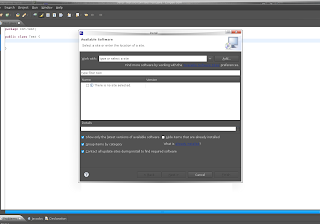
Click the checkboxes for which site Urls you want to export and Click "Export" and same the file. I saved the suggested bookmarks.xml to my Desktop.
Now I downloaded the Galileo RC4 (Galileo final release comes out tommorrow) and launched it.
Now go to Help->Install New Software..
Click on the link "Available Sofware Sites" like the one in the screenshot below:
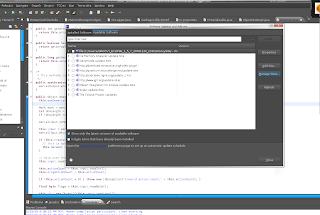
Then select Import and select the file you saved from Ganymede. Now make sure you have "Hide items that are already installed" Otherwise it will take a long time to come up with the plugin list.
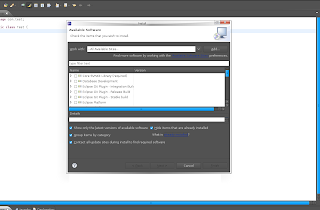
Now just install the plugins you want to install. Can't make any promises that it will actually work with Galileo :)
Over the course of using Ganymede I accumulated various plugins that I want to carry over to Galileo. I figure there must be a way to export and then import those plugin Urls.
So first I launched my Ganymede and go to Help-> Software Updates..
Then click "Manage Sites.." You should see the following Dialog:

Click the checkboxes for which site Urls you want to export and Click "Export" and same the file. I saved the suggested bookmarks.xml to my Desktop.
Now I downloaded the Galileo RC4 (Galileo final release comes out tommorrow) and launched it.
Now go to Help->Install New Software..
Click on the link "Available Sofware Sites" like the one in the screenshot below:

Then select Import and select the file you saved from Ganymede. Now make sure you have "Hide items that are already installed" Otherwise it will take a long time to come up with the plugin list.

Now just install the plugins you want to install. Can't make any promises that it will actually work with Galileo :)
Sunday, June 21, 2009
Terracotta Cluster Events: A simple example
My friend instant messaging me this weekend about this app he is writing using Terracotta. He is concerned about when a node leaves/joins and terracotta cluster and was doing some really weird stuff with the JVM Shutdown hook. I decided to do a quick blog post about Terracotta Clustered Events which is a simple way for an app to listen for terracotta cluster wide events.
So first i'll generate a new project using the pojo-archetype:
The the following prompt appears:
Now enter in a description, I typed in "This is an example project to demonstrate java clustered api" and then was prompted again and Typed in "Y"
Now we have a project to test out terracotta clustered api.
The clustered event api interfaces are available from the terracotta api jar, let's include that in our pom.xml
Change the process class to have a count of 4, so we run 4 nodes from our tests.
Now that we have our app I want it to be clustered aware. In this example, I'm not going to do anything interesting except print out when node's joins and leaves. So I added the following listener and implementation to my existing App class:
And then call registerListener from the main() function:
now run the app with the following command to see the node events
Much much more simpler then registering ShutDown hooks. The project is here
So first i'll generate a new project using the pojo-archetype:
mvn org.apache.maven.plugins:maven-archetype-plugin:2.0-alpha-5:generate \
-DarchetypeGroupId=org.terracotta.maven.archetypes \
-DarchetypeArtifactId=pojo-archetype \
-DarchetypeVersion=1.5.0-SNAPSHOT \
-DgroupId=org.terracotta.examples \
-DartifactId=clusteredapi-examples \
-Dversion=1.0.0 \
-DremoteRepositories=http://www.terracotta.org/download/reflector/maven2
The the following prompt appears:
[INFO] Scanning for projects...
[INFO] ------------------------------------------------------------------------
[INFO] Building Maven Default Project
[INFO]    task-segment: [org.apache.maven.plugins:maven-archetype-plugin:2.0-alpha-5-parent-patch-SNAPSHOT:generate] (aggregator-style)
[INFO] ------------------------------------------------------------------------
[INFO] Preparing archetype:generate
[INFO] No goals needed for project - skipping
[INFO] Setting property: classpath.resource.loader.class => 'org.codehaus.plexus.velocity.ContextClassLoaderResourceLoader'.
[INFO] Setting property: velocimacro.messages.on => 'false'.
[INFO] Setting property: resource.loader => 'classpath'.
[INFO] Setting property: resource.manager.logwhenfound => 'false'.
[INFO] [archetype:generate]
[INFO] Generating project in Interactive mode
[INFO] Archetype repository missing. Using the one from [org.terracotta.maven.archetypes:pojo-archetype:1.5.0-SNAPSHOT] found in catalog local
[INFO] Using property: groupId = org.terracotta.examples
[INFO] Using property: artifactId = clusterapi-example
[INFO] Using property: version = 1.0.0
[INFO] Using property: package = org.terracotta.examples
Define value for property 'description': :
Now enter in a description, I typed in "This is an example project to demonstrate java clustered api" and then was prompted again and Typed in "Y"
Now we have a project to test out terracotta clustered api.
The clustered event api interfaces are available from the terracotta api jar, let's include that in our pom.xml
<dependency>
           <groupid> org.terracotta.api</groupid>
           <artifactid>api</artifactid>
           <version>1.0.0</version>
</dependency>
Change the process class to have a count of 4, so we run 4 nodes from our tests.
<plugin>
            ...
                <processes>
                    <process nodename="app" count="4" jvmargs="-Xmx20m">
                        <classname>org.terracotta.examples.App
                        </classname>
                    </process>
               </processes>
</plugin>
Now that we have our app I want it to be clustered aware. In this example, I'm not going to do anything interesting except print out when node's joins and leaves. So I added the following listener and implementation to my existing App class:
public class App implements DsoClusterListener {

   @InjectedDsoInstance
private DsoCluster cluster;

public void registerListener() {
    this.cluster.addClusterListener(this);

}

...
public void nodeJoined(DsoClusterEvent dsoclusterevent) {
    System.out.println("nodeJoined Event about node: " + dsoclusterevent.getNode());
}

public void nodeLeft(DsoClusterEvent dsoclusterevent) {
    System.out.println("nodeLeft Event about node: " + dsoclusterevent.getNode());
}

public void operationsDisabled(DsoClusterEvent dsoclusterevent) {
    //;
}

public void operationsEnabled(DsoClusterEvent dsoclusterevent) {
    //
}
And then call registerListener from the main() function:
App app = new App();
app.registerListener();
app.addMessage("Hello, world");
now run the app with the following command to see the node events
mvn clean install
mvn tc:run
Much much more simpler then registering ShutDown hooks. The project is here
Saturday, June 20, 2009
Terracotta Integration Module with Maven
TIMs or Terracotta Integration Module is a way to package classes and configuration for certain interfaces and products so that you can add terracotta clustering without much effort. For example, we have a TIM for ehcache so that anyone who uses ehcache can get terracotta clustering just by including the TIM http://forge.terracotta.org/releases/projects/tim-ehcache/
Sometimes using archetypes in maven is a bit unweilding, so first we are going to check out the correct versions and make sure everything is in place.
Let's check out the maven-archetype-plugin first:
Now we want to checkout and install the tim-archetype plugin, is is what builds the directory structure and configuration for our TIM project.
To create a TIM project you need to run the following command:
this will prompt you to run the following command:
Hit enter or type in the package name you desire and hit enter.
Type in 'Y' to finish creating a newly minted TIM.
All set to go!
Sometimes using archetypes in maven is a bit unweilding, so first we are going to check out the correct versions and make sure everything is in place.
Let's check out the maven-archetype-plugin first:
svn co http://svn.apache.org/repos/asf/maven/archetype/tags/maven-archetype-2.0-alpha-4/ maven-archetype-2.0-alpha-4
cd maven-archetype-2.0-alpha-4
mvn clean install
Now we want to checkout and install the tim-archetype plugin, is is what builds the directory structure and configuration for our TIM project.
svn co http://svn.terracotta.org/svn/forge/projects/tim-archetype/trunk/ tim-archetype
cd tim-archetype
mvn clean install
To create a TIM project you need to run the following command:
mvn org.apache.maven.plugins:maven-archetype-plugin:2.0-alpha-4:generate \
  -DarchetypeGroupId=org.terracotta.maven.archetypes \
  -DarchetypeArtifactId=tim-archetype \
  -DarchetypeVersion=1.5.0-SNAPSHOT \
  -DremoteRepositories=http://www.terracotta.org/download/reflector/maven2 \
  -DgroupId=org.terracotta.modules.memcached \
  -DartifactId=tim-memcached \
  -Dversion=1.0.0
this will prompt you to run the following command:
[INFO] Using property: groupId = org.terracotta.modules.memcached
[INFO] Using property: artifactId = tim-memcached
[INFO] Using property: version = 1.0.0
Define value for property 'package':  org.terracotta.modules.memcached.tim-memcached: :
Hit enter or type in the package name you desire and hit enter.
Define value for property 'package':  org.terracotta.modules.memcached.tim-memcached: :
Confirm properties configuration:
groupId: org.terracotta.modules.memcached
artifactId: tim-memcached
version: 1.0.0
package: org.terracotta.modules.memcached.tim-memcached
 Y: :
Type in 'Y' to finish creating a newly minted TIM.
All set to go!
Friday, October 31, 2008
Back to Basics
When doing a little refactoring on terracotta server code, I was reminded on why the basics ALWAYS matters.
The server side representation of both ArrayList and LinkedList mapped to a class called ListManagedObjectState. The underlying data structure for this class was a ArrayList. We got around to mapping LinkedList to a LinkedListManagedObjectState where the underlying data structure for that class is a LinkedList.
I wrote a little test and the following where the results:
If your mutating a lot more then accessing, then LinkedList is the way to go.
Basics do matter!
The server side representation of both ArrayList and LinkedList mapped to a class called ListManagedObjectState. The underlying data structure for this class was a ArrayList. We got around to mapping LinkedList to a LinkedListManagedObjectState where the underlying data structure for that class is a LinkedList.
I wrote a little test and the following where the results:
ArrayList.add for 50000 objects took 424 ms.
LinkedList.add for 50000 objects took 198 ms.
ArrayList.addFirst for 50000 objects took 906 ms.
LinkedList.addFirst for 50000 objects took 109 ms.
ArrayList.addAt for 50000 took objects 105 ms.
LinkedList.addAt for 50000 took objects 132 ms.
ArrayList.clear for 50000 took objects 127 ms.
LinkedList.clear for 50000 took objects 49 ms.
ArrayList.removeFirst for 50000 took objects 847 ms.
LinkedList.removeFirst for 50000 took objects 70 ms.
ArrayList.remove for 50000 took objects 865 ms.
LinkedList.remove for 50000 took objects 68 ms.
If your mutating a lot more then accessing, then LinkedList is the way to go.
Basics do matter!
Thursday, October 30, 2008
DSO Garbage Collection: YoungGen
There are certain apps when clustered using Terracotta that generates short-lived DSO objects and lots of them. Which results in a lot of DSO garbage!
Taking the existing DSO garbage collector and running it more often will collect these short-lived objects, but the MARK stage could take a long time. For example, you'll have a Terracotta server array that has DSO objects on the server's cache as well as DSO objects faulted to disk. When the DSO garbage collector runs, it will fault in objects from the disk during the MARK stage. This may take awhile to run.
The DSO objects that are short-lived are probably in the server's cache. This is where YoungGen comes in. It's the same algorithm, except for the set of objects we are considering as GC Candidates. Instead of considering all the objects in the system and removing objects that are unreachable. We only consider the objects on the server's cache and remove objects that we can definitely determine as garbage.
DSO objects that cannot be collected in YoungGen is the following:
1. Roots
2. DSO Objects that in the server's cache that is being references by DSO Objects faulted to disk. This is marked in a subset called RememberMe set
3. Objects that are in the cache, but never been flushed to disk (i.e. really new objects).
enable the following properties and see if YoungGen DSO Garbage Collection works for you:
Taking the existing DSO garbage collector and running it more often will collect these short-lived objects, but the MARK stage could take a long time. For example, you'll have a Terracotta server array that has DSO objects on the server's cache as well as DSO objects faulted to disk. When the DSO garbage collector runs, it will fault in objects from the disk during the MARK stage. This may take awhile to run.
The DSO objects that are short-lived are probably in the server's cache. This is where YoungGen comes in. It's the same algorithm, except for the set of objects we are considering as GC Candidates. Instead of considering all the objects in the system and removing objects that are unreachable. We only consider the objects on the server's cache and remove objects that we can definitely determine as garbage.
DSO objects that cannot be collected in YoungGen is the following:
1. Roots
2. DSO Objects that in the server's cache that is being references by DSO Objects faulted to disk. This is marked in a subset called RememberMe set
3. Objects that are in the cache, but never been flushed to disk (i.e. really new objects).
enable the following properties and see if YoungGen DSO Garbage Collection works for you:
l2.objectmanager.dgc.young.enabled = true
l2.objectmanager.dgc.young.frequencyInMillis = 180000
Wednesday, October 29, 2008
Terracotta DSO GC Algorithm in a nutshell
There maybe a few of you out there (when I mean few, hopefully a few million :)) that maybe interested in how Terracotta collects its Distributed Objects that is no longer in use. Ok here goes...
Objects that should be collected by DSO Garbage Collection are objects which are no longer referenced by any client (meaning the object has already been GCed locally on every client that held it). So now that the clients have no more use for this object, its up to the server array to dispose of it (i.e. remove it from the server array cache or terraocotta's persistent storage).
When DGC kicks in..
1. It starts monitoring for new objects being created and keep a set of those. This is used later to rescue GC candidates.
2. It does its initial mark, which is to get all the ObjectIDs in the system. And also our roots in the system. We remove the roots and well as object reachable by roots form GC Candidates set. The objects that are left are objects that are no longer referenced by anyone
3. Remember when monitoring new object references was turned on? Now new referenced objects that appeared in our GC Candidate set can be removed from that set. This means there were new references to those objects while our first marking was going on, so they need to be rescued and not collected anymore. If after this rescue there are no GC candidates, then GC is complete.
4. If there are still GC Candidates left, then the system is paused. For us this means pausing our ObjectManager so that new lookup or create requests
goes pending (i.e no new references are created). We now do another rescue and produce our final GC Candidate set for this GC Cycle. Then new reference monitoring is turned off.
5. finally we have a have a set to delete and pass that list onto a different thread that will delete the GC Candidates from the ObjectManager in batches.
Since the delete is staged on a different thread (SEDA arch). It is possible for another GC Cycle to kick in before all the delete request complete, which can in turn create more objects to delete and life goes on...
Up next: Young GC Candidates....
Objects that should be collected by DSO Garbage Collection are objects which are no longer referenced by any client (meaning the object has already been GCed locally on every client that held it). So now that the clients have no more use for this object, its up to the server array to dispose of it (i.e. remove it from the server array cache or terraocotta's persistent storage).
When DGC kicks in..
1. It starts monitoring for new objects being created and keep a set of those. This is used later to rescue GC candidates.
2. It does its initial mark, which is to get all the ObjectIDs in the system. And also our roots in the system. We remove the roots and well as object reachable by roots form GC Candidates set. The objects that are left are objects that are no longer referenced by anyone
3. Remember when monitoring new object references was turned on? Now new referenced objects that appeared in our GC Candidate set can be removed from that set. This means there were new references to those objects while our first marking was going on, so they need to be rescued and not collected anymore. If after this rescue there are no GC candidates, then GC is complete.
4. If there are still GC Candidates left, then the system is paused. For us this means pausing our ObjectManager so that new lookup or create requests
goes pending (i.e no new references are created). We now do another rescue and produce our final GC Candidate set for this GC Cycle. Then new reference monitoring is turned off.
5. finally we have a have a set to delete and pass that list onto a different thread that will delete the GC Candidates from the ObjectManager in batches.
Since the delete is staged on a different thread (SEDA arch). It is possible for another GC Cycle to kick in before all the delete request complete, which can in turn create more objects to delete and life goes on...
Up next: Young GC Candidates....
Subscribe to:
Posts (Atom)